TNPSC Photo and Signature Compressor Online
TNPSCIQ provides a free TNPSC Photo and Signature Compressor Online tool to help candidates prepare their photographs and signatures for TNPSC Group 1, Group 2, Group 2A and Group 4 examinations. Easily resize, compress and adjust your photo and signature according to the required application specifications. Our user-friendly online tools help you prepare images quickly without installing any software. Upload your image, adjust the required dimensions and file size, and download the processed file instantly. Make your TNPSC online application process simple, quick and convenient with TNPSCIQ.
Quick Reference — TNPSC Photo vs. Signature Specifications
Before generating your files, verify the exact requirements in your active recruitment notification on tnpsc.gov.in. Most TNPSC Group 1, Group 2, Group 2A, and Group 4 applications follow these standard formatting rules:
Important Note: Always cross-check the latest official TNPSC notification for your specific post, as pixel and KB limits occasionally vary between OTR updates and individual recruitment drives.
How to Resize and Compress TNPSC Images (4 Steps)
Why TNPSC Application Uploads Fail (And How to Fix Them)
Your Photos and Signatures Stay on Your Device
Your identity documents are private. Unlike cloud converters that upload your files to remote storage, TNPSC IQ processes all resizing, cropping, text stamping, and compression locally inside your web browser using HTML5 Canvas technology. Your photographs and signatures are never transmitted to or saved on our servers.
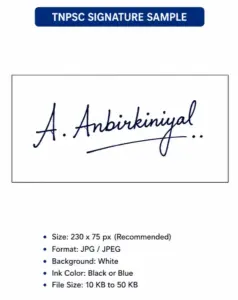
TNPSC Sample Photograph & Signature Preview
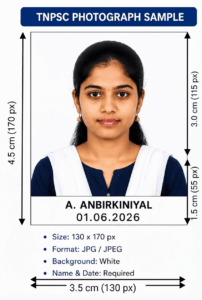
TNPSC Photo Compressor is a free online tool designed to help candidates prepare photographs for Tamil Nadu Public Service Commission (TNPSC) applications. Many recruitment notifications require applicants to upload photographs and signatures that meet specific size, format, and quality requirements.Our tool simplifies this process by allowing users to resize, compress, and optimize images directly from their browser without installing any software. Whether you are applying for Group 1, Group 2, Group 2A, Group 4, or other TNPSC examinations, the tool helps prepare images quickly and efficiently.Photo CompressionPhoto Compression helps reduce the file size of a photograph while maintaining good visual quality. Large image files may exceed upload limits and cause application submission errors. The TNPSC Photo Compressor automatically optimizes photographs so they become easier to upload while remaining clear and readable.Reduces image file size.Maintains photograph clarity.Supports JPG and JPEG formats.Helps meet upload requirements.Works on mobile and desktop devices.
Signature Compression is designed to help candidates prepare scanned signatures according to application requirements. Oversized signature files often fail during upload. Our signature compression tool reduces file size while preserving the visibility and readability of the signature.
Optimizes signature image size.Maintains signature visibility.Produces application-friendly files.Supports quick download.Simple and beginner-friendly process.By using TNPSC IQ, candidates can prepare both photographs and signatures efficiently, reducing the chances of upload errors during the online application process.